> ## Documentation Index
> Fetch the complete documentation index at: https://docs.sprig.com/llms.txt
> Use this file to discover all available pages before exploring further.
# No Code Event URLs
> Fine control over how your studies are triggered.
A Page URL event fires when the browser views a page matching the URL that you have defined. However, you may need to refine further how an Event is triggered in your application. Sprig provides several different ways to specify how the string matches the URL that you are targeting. When you are adding or editing an event, if you click on the **URL** menu you will see:
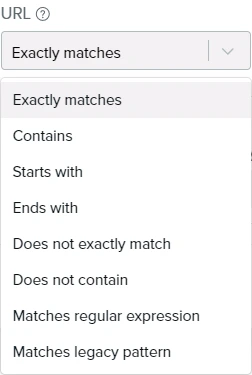 The following table describes the functionality of each menu item:
| **Menu Item** | **Description** | **Example** |
| :------------------------- | :------------------------------------------------------------------------------------------------------------------------------------------------------------------------------------------------------------------------------------------------------------------------------------------------------------------------------------------------------------------------------------------------------------------------------------------- | :---------------------------------------------------------------------------------------------------------------------------------------------------------------------------------------------------------------------------------------------------------------------------------------------------------------------------------------------------------------- |
| Exactly matches | The URL must exactly match the string you entered in the **URL**field.
Identical domains in URLs with different paths do not fire events. | You specify: [www.example.com.](http://www.example.com./)
Only page views at [www.example.com](http://www.example.com/) trigger events.
Page views at [www.example.com/signup](http://www.example.com/signup) and
or example.com do not trigger events. |
| Contains | This fires an event when the user accesses a URL which includes a specific string. | You specify: example.
Page views at [www.example.com](http://www.example.com/)
and [www.example.com/signup](http://www.example.com/signup) trigger events. |
| Starts with | The URL must start with the string you entered in the **URL**field. | You specify: exa.
Page views at example.com trigger events.
Page views at [www.example.com](http://www.example.com/) do not trigger events. |
| Ends with | The URL must end with the string you entered in the **URL**field. | You specify: com.
Page views at example.com trigger events.
Page views at example.net do not trigger events. |
| Does not contain | This fires an event when the user accesses a URL which DOES NOT include a specific string. | You specify: net.
Page views at example.com trigger events.
Page views at example.net do not trigger events. |
| Does not exactly match | This fires an event when the user accesses a URL which DOES NOT exactly match the string you entered in the **URL**field. | You specify: [www.example.com.](http://www.example.com./)
Page views at [www.example.net](http://www.example.net/) and example.com trigger events.
Page views at [www.example.com](http://www.example.com/) do not trigger events. |
| Matches regular expression | A regular expression specifies a pattern to be matched on. The string must match the regular expression.
The syntax of the regular expression is described [here](https://developer.mozilla.org/en-US/docs/Web/JavaScript/Guide/Regular_Expressions/Cheatsheet).
Note: When using "Matches regular expression", there is a limit of 255 characters per expression. | You specify: example.com/(login\|signup)
Page views at example.com/login and example.com/signup trigger events.
Page views at example.com/help do not trigger events. You specify: example.com/(?!login\|signup)
Page views at example.com/help trigger events.
Page views at example.com/login and example.com/signup do not trigger events. |
| Matches legacy pattern | If you had been using the Page URL functionality before September 27, 2021 expressions were created with a regular
expression pattern that is now referenced as **Matches legacy pattern**. While the legacy functionality will continue to
be supported, we recommend you update to the latest, standardized option by editing your Page URL
event and updating the event with the **Matches regular expression** option. | |
## Wildcards (\*)
Wildcards (\*) are supported for both No Code URL events created from the Events page in addition to inline URL events created from the Targeting card.
For example, exactly matching [www.example.com/\*/dashboard](http://www.example.com/*/dashboard) will include any URL that has zero or more characters in place of \*, but will not include [www.example.com](http://www.example.com)
Note: Note, if you'd like to use a literal asterisk instead of a wildcard, please select "Matches regular expression" and add a backslash before the asterisk like so: "\*"
## Testing your Matching Pattern
Once you have completed your matching pattern, enter the URL you are trying to match in the **Test Your Event** field and click **Test Match** to see if your event's URL pattern matches the URL that you want to be tracked.
## Page URL Priority
Sprig can only track a single No Code URL event per page. Sprig uses the following priority stack to determine which No Code URL event to track in the case of multiple candidate events for a particular page:
1. Exactly matches
2. Matches regular expression
3. Starts with
4. Ends with
5. Contains
6. Does not contain
7. Does not exactly match
8. Matches legacy pattern
Events used as triggers for *In Progress* studies will always trigger over events not used as a trigger in an *In Progress* study.
For overlapping events - meaning multiple events that could fire on a single page load - Sprig will record events in an equal distribution.
For more information about no-code events, [see here](/docs/shared-study-foundations/events/no-code-events).