> ## Documentation Index
> Fetch the complete documentation index at: https://docs.sprig.com/llms.txt
> Use this file to discover all available pages before exploring further.
# Mobile Replays
> Capture clips based on user actions and attributes to see how specific users experience your mobile product.
## Overview
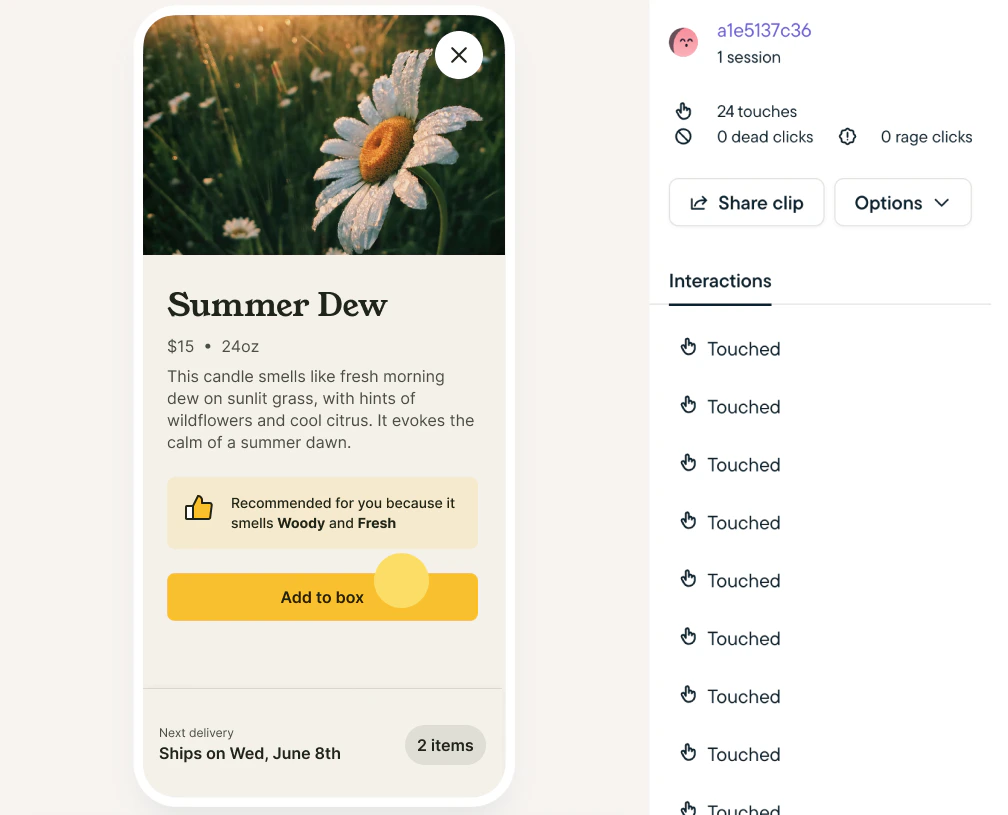
Sprig Mobile Replays enable you to target specific users in your product and capture clips of their real-time, in-app product experience. Replays can be either launched as standalone recordings of user behavior or alongside an In-Product survey.
Native Android, Native iOS (SwiftUI), React Native, and Segment (React Native, iOS, Android) are supported.
 ## How it Works
Our mobile session replay is built with performance and security in mind. To protect sensitive user data, it starts with a secure-by-default configuration that includes automatic data obfuscation and masking.
Fore more details visit [Mobile Replay Privacy & Performance](/docs/support-privacy-and-technical/technical-considerations/mobile-replay-privacy-performance).
## Getting Started
1. Install or update to the latest SDK for [Android](/docs/Installation/introduction-mobile/android-sdk-installation/index), [iOS](/docs/Installation/introduction-mobile/ios-sdk-installation), [React Native](/docs/Installation/introduction-mobile/react-native-module) or Segment ([iOS](/docs/Installation/introduction-mobile/segment-ios), [Android](/docs/Installation/introduction-mobile/segment-android), [React Native](/docs/Installation/introduction-mobile/segment-react-native)).
1. You can check your current SDK version at [Settings > SDK & Traffic](https://app.sprig.com/settings/sdk-and-traffic).
2. [Create a Replay Study](/docs/sprig-studies/replays/index).
1. Select Mobile as your delivery platform.
2. Mobile replays currently only support clip capture for up to 3 minutes *after* the event trigger.
3. Review Replay clips instantly on your dashboard.
## SDK Requirements / Platform Support
| Platform/Module | minVersion |
| :-------------- | :----------------------------------------------- |
| iOS | v4.22.0
## How it Works
Our mobile session replay is built with performance and security in mind. To protect sensitive user data, it starts with a secure-by-default configuration that includes automatic data obfuscation and masking.
Fore more details visit [Mobile Replay Privacy & Performance](/docs/support-privacy-and-technical/technical-considerations/mobile-replay-privacy-performance).
## Getting Started
1. Install or update to the latest SDK for [Android](/docs/Installation/introduction-mobile/android-sdk-installation/index), [iOS](/docs/Installation/introduction-mobile/ios-sdk-installation), [React Native](/docs/Installation/introduction-mobile/react-native-module) or Segment ([iOS](/docs/Installation/introduction-mobile/segment-ios), [Android](/docs/Installation/introduction-mobile/segment-android), [React Native](/docs/Installation/introduction-mobile/segment-react-native)).
1. You can check your current SDK version at [Settings > SDK & Traffic](https://app.sprig.com/settings/sdk-and-traffic).
2. [Create a Replay Study](/docs/sprig-studies/replays/index).
1. Select Mobile as your delivery platform.
2. Mobile replays currently only support clip capture for up to 3 minutes *after* the event trigger.
3. Review Replay clips instantly on your dashboard.
## SDK Requirements / Platform Support
| Platform/Module | minVersion |
| :-------------- | :----------------------------------------------- |
| iOS | v4.22.0
v4.23.5 |
| Android | v2.17.6 |
| React Native | Android: v2.18.1 (coming soon)
iOS: v2.18.0 |
\*UIKit support only. **Note:** feature will work for all app builds, SwiftUI elements may render as empty white blocks
\*\*Inclusive of UIKit and SwiftUI element rendering
# Mobile Replay Offerings by Platform
Mobile Replay functionality differs on iOS and Android due to platform-specific technical constraints. Because of these different implementations, you may notice variations in clip playback resolution and overall fidelity. Sprig Mobile Replay currently can not capture web views.
## iOS: Wireframe Capture
* Periodically records the structure and positioning of UI elements (layout, hierarchy, images).
* Reconstructs these elements into a wireframe representation of the user experience.
> **Warning:** SwiftUI & WKWebView Limitations
>
> Replays for iOS by default do not capture SwiftUI text and images, as well as content in WKWebViews. Users can opt-in to capture these elements in the iOS tab of Settings→ Replays Configure, but should first learn about the [performance considerations](/docs/support-privacy-and-technical/technical-considerations/mobile-replay-privacy-performance#ios-wkwebview--swiftui-text-and-image-replay-recording-considerations) related to capturing these elements.
## Android: Screenshot Capture
* Periodically takes full screenshots of the UI, including text and images.
* Masks or redacts sensitive information on the device, ensuring such data is never sent to or stored on Sprig’s servers.
## React Native
* Follows the approach of the underlying platform (wireframe on iOS, screenshot on Android), as determined by the user’s device.
## Privacy & Performance Considerations
Sprig was built with performance and privacy as top priorities - including Replays.
By default, all secure form contents (including password fields) are not recorded or stored. [Learn more](/docs/support-privacy-and-technical/technical-considerations/mobile-replay-privacy-performance).