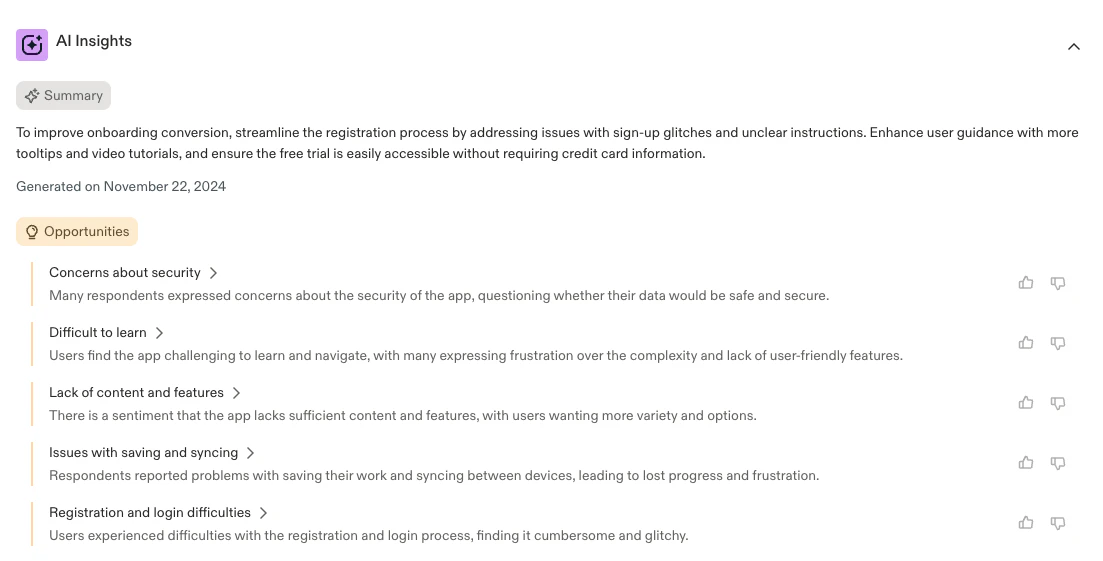
What is Sprig AI Explorer?
Sprig AI Explorer generates actionable reports about your entire product experience by analyzing data across all of your Sprig studies. Here’s how it works:- Ask anything about your product: Ask Sprig AI any custom questions about your product, like: How can I boost onboarding conversion? Are users experiencing product friction points?
- Analyze your entire product at scale: Sprig AI analyzes across all your Sprig studies to find product experience data that’s relevant to your specific question.
- Understand exactly what to do next: Sprig AI generates a custom insights report to answer your product question and tell you how to take action.
How to Create an AI Explorer Report
- In the Sprig navigation bar, select “Explorer” to view all AI Explorer analysis reports.
- Click “New Report” and enter a custom product question. Sample prompts are available if needed.
- Filter the analysis based on user flows or product areas relevant to your inquiry. You can narrow down the report by selecting specific Sprig studies.
- Filter results by specifying a date range for the data to be included in the analysis.
- Click “Create Report” to initiate the analysis. Sprig AI will review all relevant product experience data to answer your question.
- The report will provide a summary, actionable insights, and opportunities based on Sprig AI’s analysis of your specific product challenge.
- Click on any insight to view the Sprig user sentiment and behavior data that contributed to Sprig AI’s findings.
- Once ready click “Save Report” to reference later and share visibility across your team.