

In June 2024, Sprig moved a new pricing and usage model based on individual Study Units (responses, clips and Heatmap captures) and Monthly Unique Users to better support a broader diversity of customers. Learn more.
Study Usage
How is my Study usage tracked?
Any study (Heatmap, Replay, Survey or Feedback) that receives one or more pieces of user data (capture, replay clip, Survey response or Feedback response) in a calendar month is considered is considered Active and will counts towards your Active Monthly Study limit. Only studies launched in Production environments count towards your monthly limitsAn in product survey, feedback study or heatmap study with an attached Replay will only be counted as an active survey
When do monthly Active Study usage limits reset?
Your monthly usage allowance for studies will be renewed at the start of each calendar month. You can see your team’s Turnover Date in the Sprig app by going to Settings > Usage.Monthly Tracked Users (MTUs) Usage
What is an MTU?
Monthly Tracked Users (MTUs) is a measure of the number of unique Visitors within a month that have visited your web page or interacted with your application and you’ve decided to send their events/attributes to Sprig. It is important to note that an MTU is not necessarily a person that been captured in a study. MTUs are an important factor in billing, as exceeding your monthly usage limit may result in being unable to launch additional studies or your active studies being unable to collect responses. Enterprise Plans offer a customizable number of MTUs, Starter Plans have a hard limit of 25,000 MTUs, and Free Plans have a hard limit of 5,000 MTUs. To estimate how many MTUs you’ll need for your Sprig plan, you can use your monthly active user (MAU) count from your product analytics tool as a starting point. If you would like to increase your MTU limits or upgrade your plan, please reach out to SalesHow is MTU usage tracked and how can I monitor usage?
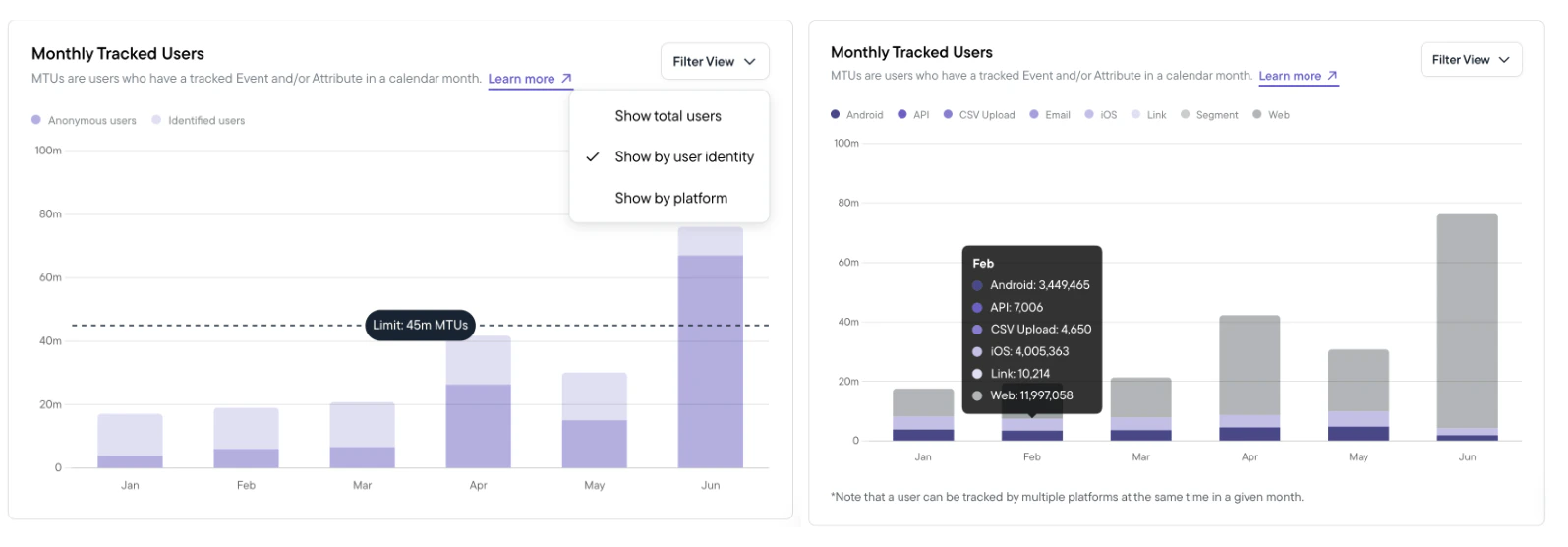
MTU allocation is shared across all Products within a Team and across all Environments. To monitor your team’s MTU usage throughout the month, head over to Settings > Usage in the Sprig app. Additionally, you will be proactively alerted at various usage milestones as you approach MTU limits.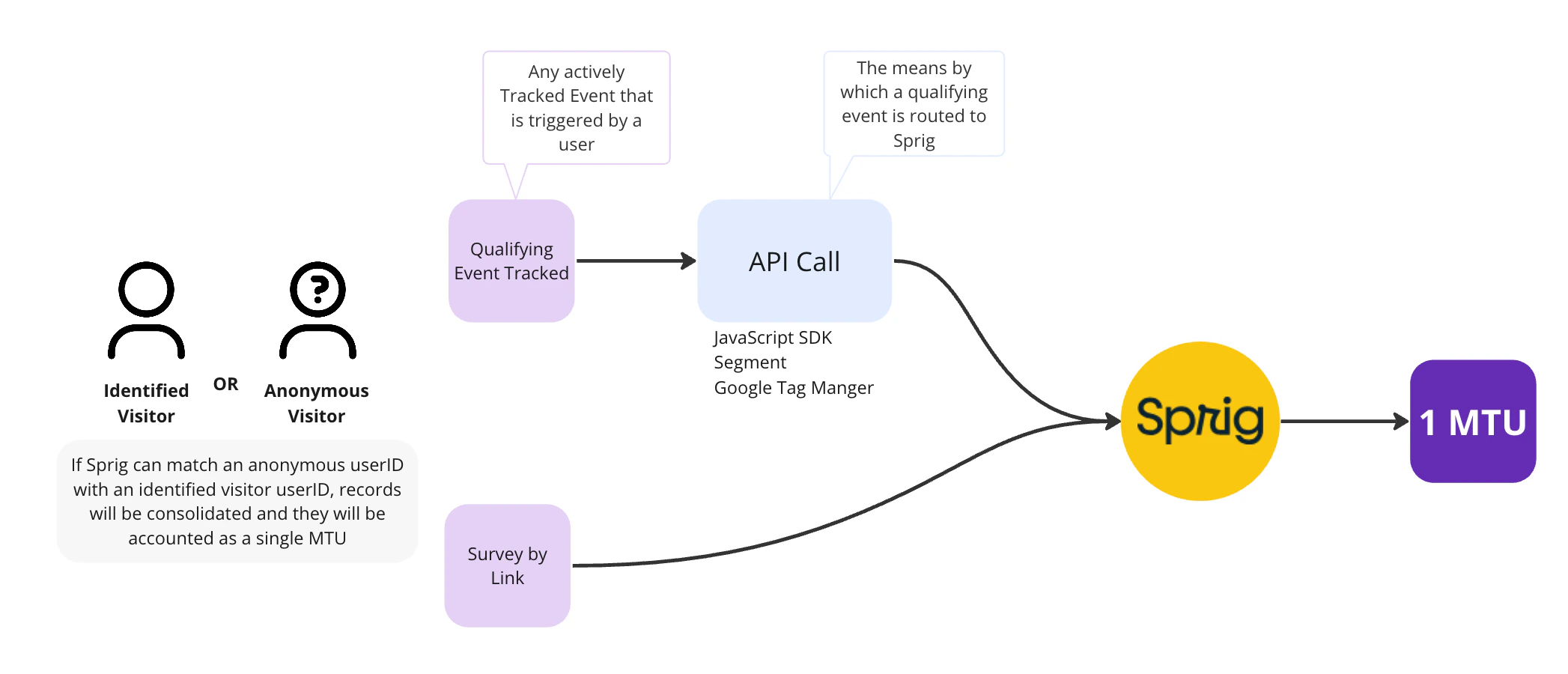
What are Events & Attributes?
Events - Events are behaviors tracked in your application about a user and are used to trigger (display) studies after the user performs a specific action (e.g. Dashboard - Clicked - Download CSV) Attributes - Attributes are information tracked about a user and are used to refine the target users and filter the response data. Example attributes include (language, role, plan_type, browser etc)How do Events & Attributes impact MTU accounting?
Tracking events that are not triggers for an active survey could lead to users that are counted as an MTU:- For example, if you are tracking the event Dashboard - Clicked - Download CSV but you don’t have an active survey that will trigger on that event, you will still accumulate MTUs from users that trigger the event.
Some customers will be kept on the legacy MTU counting system. Please reach out to your customer success rep with any questions.
When do monthly MTU usage limits reset?
Your monthly usage allowance for MTUs will be renewed on your Turnover Date each month. You can see your team’s Turnover Date in the Sprig app by going to Settings > Usage.How can I reduce my team’s MTU usage?
If you’re looking to avoid MTU overages and want to reduce your MTU count, consider one or more of the following options:- Track User IDs: Manage user identity consistently to limit the number of “anonymous” users who may be counted multiple times during a month. This is especially important if you’re using Sprig SDK with other Integrations like Segment or Google Tag Manager. See installation guide for best practices.
- Archive unused Events: Events you’ve asked Sprig to track could result in a qualifying event that may count towards your MTU usage. Navigate to Events to view and archive unused Events.
- Upgrade your plan and/or Increase MTU limits by talking with Sales
- MTU Sampling: (Not recommended) Admins can request Sprig Customer Success to implement sampling to control the amount of traffic sent to Sprig from your App.
Other Usage FAQs
What are some reasons that my MTUs are higher than expected?
There could be a few reasons why you might be seeing higher MTUs usage than expected:- MTUs can include visitors that are not exposed to a study based on satisfying visitor tracking events. See How do Events & Attributes impact usage?
- Sprig generated visitor IDs are not correctly being coupled with the unique user IDs assigned to users within your platform’s internal authentication framework resulting in multiple MTUs for the same users. See Installation Guide for best practices for user ID management.
- Though it is rare, a user can be counted multiple times towards MTU limits. This can happen when a user accesses your website or application from one browser, but later opens your app anonymously on a different device or platform. Double counting can also happen if a user has two unlinked user IDs and uses both of them in a single month.